
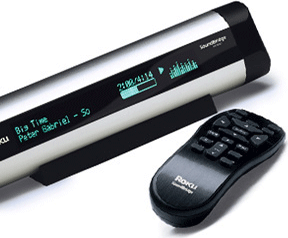
IMAGE SHOWN: M1001
Large VFD Display - The M1001 features a 280x16 pixel display, for up to two lines of text. Its "big line mode" displays your current selection in a large, 16-pixel-sized font.
Compact Body - 10 inches wide, perfect for a shelf, tabletop or nightstand.
MEDIA STREAMING Music Anywhere - Connect to your stereo or powered speakers to play your favourite digital music in any room of the house via an Ethernet or Wi-Fi home network. Media Streaming Information -
Streaming multimedia is multimedia that is constantly received by, and normally displayed to, the end-user while it is being delivered by the provider. The name refers to the delivery method of the medium rather than to the medium itself. The distinction is usually applied to media that are distributed over telecommunications networks, as most other delivery systems are either inherently streaming (e.g. radio, television) or inherently non-streaming (e.g. books, video cassettes, audio CDs). The verb 'to stream' is also derived from this term, meaning to deliver media in this manner.
History
Attempts to display media on computers date back to the earliest days of computing, in the mid-20th century. However, little progress was made for several decades, due primarily to the high cost and limited capabilities of computer hardware.
Academic experiments in the 1970s proved out the basic concepts and feasibility of streaming media on computers.[citation needed]
During the late 1980s, consumer-grade computers became powerful enough to display various media. The primary technical issues with streaming were:
having enough CPU power and bus bandwidth to support the required data rates
creating low-latency interrupt paths in the OS to prevent buffer underrun[citation needed]
However, computer networks were still limited, and media was usually delivered over non-streaming channels, such as CD-ROMs.
The late 1990s saw:
greater network bandwidth, especially in the last mile
increased access to networks, especially the Internet
use of standard protocols and formats, such as TCP/IP, HTTP, and HTML
commercialization of the Internet
These advances in computer networking combined with powerful home computers and modern operating systems made streaming media practical and affordable for ordinary consumers. Stand-alone Internet radio devices are offering listeners a "no-computer" option for listening to audio streams.
In general, multimedia content is large, so media storage and transmission costs are still significant; to offset this somewhat, media is generally compressed for both storage and streaming.
A media stream can be on demand or live. On demand streams are stored on a server for a long period of time, and are available to be transmitted at a user's request. Live streams are only available at one particular time, as in a video stream of a live sporting event.
Research in streaming media is ongoing and representative research can be found at the Journal of Multimedia.
The SoundBridge plays your PC or Mac MP3 music files stored on your Computer using Wifi / Wireless and connects to any HiFi / Stereo equipment anywhere in your home. Or, listen to a variety of Internet Radio stations without even turning on your computer. WMA, MP3, AAC, AIFF and WAV music formats are supported - making it the most compatible music player around.
Compatible Player - Play directly from iTunes* and Windows Media Player. Compatible with Rhapsody and all PlaysForSure music services such as Napster, Musicmatch, MSN Music, Walmart.com and more.
All Popular Formats - Supports a wide range of music formats including WMA, AAC*, WAV, MP3 and AIFF.
Internet Radio - Listen to hundreds of free music and talk Internet radio stations from around the world without even turning the computer on; and save up to 18 of your favourite stations as presets for easy recall.
Social and legal issues
Some streaming broadcasters use streaming systems that interfere with the ability to record streams for later playback, either inadvertently, through poor choice of streaming protocols, or deliberately. Some of these broadcasters place these interferences on their media because they believe it is to their advantage to control their copyrighted material or necessary for compliance to licensing requirements by content providers. A concern for some broadcasters is that these copies of broadcasted material will result in lost sales. Whether users have the ability and the right to record streams has become a significant issue in the application of law to cyberspace.
According to some, there is no way to prevent a user from recording a media stream that has been delivered to their computer. Bruce Schneier once said, "Digital files cannot be made uncopyable, any more than water can be made not wet."[3] To date, efforts to prevent copying streaming media has been limited to making it inconvenient, illegal, or both.
One method of interfering in recording streaming media is DRM (Digital Rights Management) technologies. The DRM does not prevent a user from recording the streamed bits but the DRM gives some control of the reproductions or plays of the recorded file to a streaming media provider by requiring a key to unlock or decrypt the content.
Using unpublished data formats is another way for streaming media providers to prevent copying of their media. This security method can be reverse engineered, and encrypted streams must be decrypted with a key that resides on the consumer's computer, so these measures are security through obscurity, at best.
Efforts to make it illegal to record a stream may rely on copyrights, patents,[citation needed] license agreements, or national legislation that implements the anti-circumvention provisions of the WIPO Copyright Treaty.
Streamium is a line of IP-enabled entertainment products by Dutch electronics multi-national Philips Consumer Electronics. Streamium products allow users to consume digital entertainment and multimedia content --whether stored on their desktop computers or delivered through Internet-based services-- on their home entertainment and/or audio sets. Using Wi-Fi music streams wirelessly to almost any type of audio equipment, anywhere in a house. With a Wireless Multimedia Adapter, it is also possible to play downloaded movies directly on an analog television set or to access the internet wirelessly.
Essentially, how it works is that a Streamium device plugged into the local home network will be able to see multimedia files that are in different UPnP-enabled computers, PDAs and other networking devices (loaded with UPnP AV MediaServer software). I.e. NAS that supports UPnP, or even a UPnP enabled phone like the Nokia N93, Nokia N80 etc.
Moreover, the Streamium family of products, depending on the media capabilities, allows a consumer to connect to internet radio stations and internet photo sharing (Yahoo! Photos), movie trailers services directly. Subscriptions to web-based services requiring subscriptions would be managed through the Club Philips portal (see below).
In all cases, using a computer with RSS receiver together with a UPnP AV MediaServer, it is possible to play back audio/video podcast. Some of the popular feeds include BBC live, Geekbrief, Reuters, Metacafe, YouTube. Although in most cases this video podcaster uses codec formats not supported by Streamium, it's still possible by using software codec transcoders on the PC to convert them to MPEG format.
Philips Media Manager, is--since SimpleCenter version 4-- a free open source UPnP AV MediaServer for Windows and Macintosh that is bundled with Streamium. Version 3 of SimpleCenter, was initially developed for inclusion with the Streamium line of products. Since Streamium devices also support photos and videos, SimpleCenter ships with video and image support, under the name 'Philips Media Manager' (PMM).[1]
Options:
Digital music streaming systems
Multimedia Links to add to your existing LCD TV and Stereo system.
Access all types of files and Internet with Streamium
Streamium uses Wi-Fi (wireless fidelity) technology. It works with both Microsoft Windows-based computers and Macintosh computers
SoundBridge is a remote hardware device from Roku designed to play internet radio or digital audio streamed to it across a home network, either WiFi or Ethernet. SoundBridge devices directly browse the Radio Roku Internet Radio Guide.
The music is made available by a streaming server, usually a PC running a software server. What sets the SoundBridge apart from other network media players are its high resolution vacuum fluorescent display and compatibility with many different media servers, namely servers using Apple Computer's Digital Audio Access Protocol (popular servers are iTunes or mt-daapd), Windows Media Connect, Rhapsody, SlimServer, and UPnP (Universal Plug and Play) compatible servers like TwonkyVision. Some of these servers can be run not only on PCs, but also on NAS devices like the Linksys NSLU2, so a SoundBridge can be operated without a PC.
There are several SoundBridge models: The M1000, the M500 (an M1000 with a cheaper LCD instead of the VFD), and the discontinued M2000, which had a larger and even higher-resolution display than the M1000. The M1000s sold now are slightly different from older M1000s and can be identified by having their connectors at the back, rather than under the end caps. The new revisions are sometimes called M1001 and are mainly an internal redesign to cut manufacturing costs. Most users won't notice any difference, which is reflected by the fact that these units are still sold as M1000s. There is also a tabletop model called the SoundBridge Radio that has built in speakers, an AM/FM radio, and an alarm clock.
SoundBridge players sold in the United States are made by Roku, and include:
M1001 SoundBridge (bitmapped VFD display - 280x16; similar to original M1000 model(see note))
R1000 SoundBridge Radio (bitmapped VFD display - 280x32; AM/FM tuner; SD card slot; built-in speakers)
M500 SoundBridge (character-based LCD display - 40 characters x 2 lines) (discontinued)
M1000 SoundBridge (bitmapped VFD display - 280x16) (discontinued)
M2000 SoundBridge (bitmapped VFD display - 512x32; larger, 17" enclosure with very large display) (discontinued)
NOTE: The M1001 uses the newer design style, unlike the older discontinued "M" series units, the M1001 does not have removable side caps or a removable Wi-Fi card (CF form factor). The M1001 has its connections in the rear of the unit, unlike the older ones that had theirs behind the removable side caps
Outside the United States, SoundBridge models are manufactured and sold by Pinnacle, under license from Roku. Although some Pinnacle models are similar or identical in hardware, Pinnacle does not have a license for the DAAP protocol, so Pinnacle models cannot connect directly to iTunes. Pinnacle and Roku promote the Firefly Media Server as an alternative that offers similar functionality. Pinnacle models include:
SoundBridge (identical to Roku SoundBridge M1001)
SoundBridge Radio (identical to Roku SoundBridge Radio)
Soundbridge HomeMusic (character-based LCD - 16 characters x 2 lines; no Ethernet; no digital output; SD card slot; low-cost plastic housing in place of aluminum extrusion on original models)
WPA support
Firmware version 2.7 supports WPA, but only for the M1001, the SoundBridge Radio, and the European versions from Pinnacle, not for the older M500/1000/2000 versions. The SoundBridge is an 802.11b device, but it can be used with backward compatible 802.11g networks.
The Squeezebox is a hardware device from Slim Devices. It is designed to play internet radio or digital audio streamed to it across a home network, either WiFi or Ethernet.
There are two different running modes:
Standalone mode connecting to an internet server, without a PC.
Squeezebox can be used with a SlimServer running on a home PC or also on NAS devices like the Linksys NSLU2, so a SlimServer can also run without a PC.
Squeezebox (November 2003)
Second generation hardware, which originally used the same display. Main feature additions included optional 802.11b WiFi, support for uncompressed PCM/WAV/AIFF audio streams, and headphone, coaxial and optical SPDIF outputs. It also requires SlimServer to operate. Slim Devices offered a bitmap display upgrade for this hardware, but that is no longer available. Some units have a 40x2 Noritake character display, others have a 280x16 pixel Noritake bitmap display.
Squeezebox2 (April 2005)
Third generation hardware. Features included optional 802.11g WiFi, native support for more audio formats (FLAC, WMA, Ogg), upgraded 320x32 pixel greyscale bitmap VFD display, visualizers, bitmapped fonts.
This model has infrared remote control, analog outputs, volume control, headphone jack, coaxial and optical digital outputs.
The Squeezebox2 supports numerous audio formats including MP3, Windows Media Audio, Musepack, Monkey's Audio, Apple Lossless, FLAC, Shorten, WAV, AIFF, Ogg Vorbis, and unencrypted AAC. Of these, MP3, Windows Media, FLAC, WAV, AIFF and Ogg Vorbis are natively supported by the player firmware; the remainder are automatically transcoded by the SlimServer host software into one of the player-supported formats. DRM-protected AAC from the Apple iTunes Music Store is not supported.
Squeezebox v3 (November 2005)
Fourth generation hardware. Features and most technical specifications are identical to that of the Squeezebox2. A new board and chassis design are used, as well as a new remote.
Dimensions: 7.6"W x 3.7"H x 3.1"D (192mm x 93mm x 80mm) including stand.
Transporter (September 2006)
Fifth generation hardware. Features are similar to Squeezebox v3. Geared towards audiophiles. Additional features over Squeezebox v3 include dual 320x32 pixel displays, front panel buttons and tactile feedback knob, redesigned backlit remote control, balanced (XLR) and unbalanced audio outputs, balanced and unbalanced digital inputs and outputs (AES/EBU and SPDIF) (inputs for operation as a standalone DAC), RS-232 serial connection for external control, Infrared input and output.






